Does a VPN Hide Torrenting From Your ISP? What Leaks (2026)
Yes. A working VPN hides torrenting from your ISP: your provider sees one encrypted connection to a VPN server, not BitTorrent, not the peers and not the files. There are three caveats. The hiding fails the moment something leaks around the tunnel; your ISP can still see that you use a VPN, when, and how much data moves; and whoever runs the VPN now holds the view your ISP lost.
That makes this guide useful to two kinds of reader: people who want ordinary privacy for lawful peer-to-peer, such as Linux images, open datasets and their own backups, and people who simply want to understand what their provider can log. If you want a VPN to make copyright infringement safe, it will not, and nothing here is written to help with that. Below is the ISP's view side by side, the leaks that quietly undo it, a three-step test you can run in five minutes, and what still gives the game away.
Yes, with three caveats
The short answer holds for any reputable VPN that is connected and configured properly. Your torrent client's traffic is wrapped inside the VPN protocol, encrypted on your device and only unwrapped on the VPN server. To your ISP the whole session looks like a single stream of encrypted packets going to one address. The caveats are where people get caught out, so it is worth stating them plainly before going further.
- Leaks. If the tunnel drops, if your client is excluded by split tunnelling, or if IPv6 or DNS traffic takes another route, your ISP sees that traffic in the clear. The protection is only as good as the weakest path out of your machine.
- Metadata. Your ISP still sees the VPN server's IP address, the times you connect and the volume you move. That is far less than before, but it is not nothing.
- The provider. The VPN company can see what your ISP used to see. Hiding torrenting from your ISP only helps if the party you hand that view to keeps no record of it.
What your ISP sees without a VPN
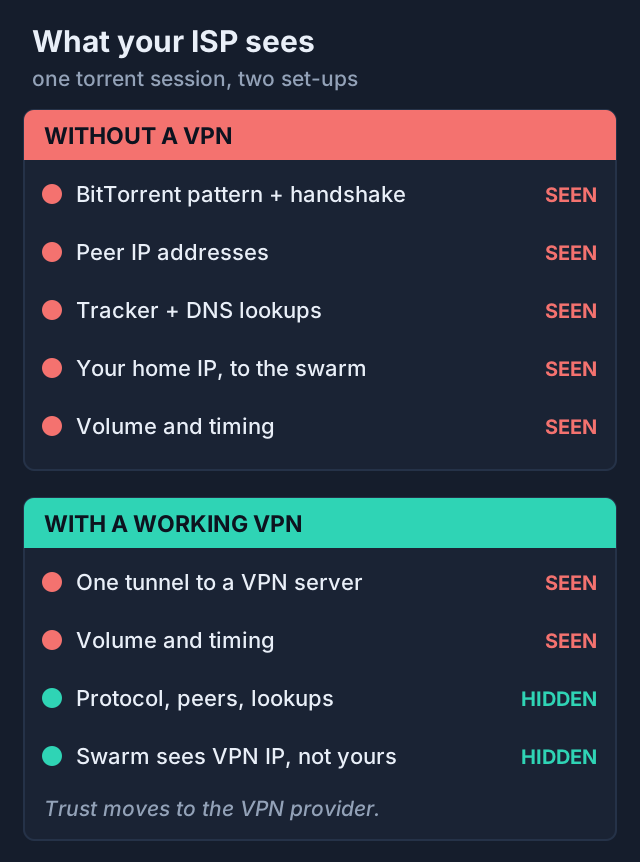
Without a VPN, your ISP routes every packet and can inspect as much of it as it likes. BitTorrent is easy to spot. The handshake between peers carries a recognisable protocol string, trackers are contacted over ordinary web requests, and a torrent session has a distinctive shape: dozens or hundreds of simultaneous connections to scattered home IP addresses, all exchanging data in both directions. Deep packet inspection systems are built to classify exactly this kind of traffic.
Turning on your client's own protocol encryption makes the payload harder to read but leaves the pattern intact, and it does nothing about your IP address. So without a VPN your ISP can log that you run BitTorrent, the peer addresses you connect to, how much you upload and download, and when. Separately, every peer in the swarm sees your home IP, which is how rights holders who join swarms collect the addresses they send to ISPs. Our guide to why people use a VPN for P2P covers the swarm side in more detail.
What your ISP sees with a VPN
With a VPN connected, almost all of that collapses into one line in your ISP's records: this customer exchanged encrypted traffic with this server, for this long, in this volume. The peers, the tracker requests, the protocol string and the file contents are all inside the encrypted tunnel. The swarm, meanwhile, sees the VPN server's address instead of yours. The diagram shows the two views next to each other.
One practical side effect is throttling. If your ISP slows BitTorrent specifically, it needs to identify BitTorrent first. Inside a VPN tunnel it cannot, so P2P-specific throttling usually stops working. A provider that throttles all heavy or encrypted traffic is a different matter, and a VPN will not fix that.
| Item | Without a VPN | With a working VPN |
|---|---|---|
| That you run BitTorrent | Yes, by traffic pattern and handshake | No, only that you use a VPN |
| Peer IP addresses | Yes | No |
| Tracker and DNS requests | Yes | No, if DNS stays in the tunnel |
| File names and contents | Often, unless the client encrypts | No |
| Your IP visible to the swarm | Your home IP | The VPN server's IP |
| Volume and timing | Yes | Yes |
| The VPN server you connect to | Not applicable | Yes |
If that is the view you want for your lawful transfers, the next decision is which provider you trust to sit in the middle. NordVPN lets you torrent on any standard server, and Deloitte checked its no-logs set-up again at the end of 2025; you can check NordVPN's current plans. Proton VPN allows P2P on all paid plans and is a good fit if you also want port forwarding; see Proton VPN's plans. Our best VPN for torrenting comparison sets out the other options. Whichever you pick, set it up with the checks below before you start a long transfer.
Leaks: kill switch, split tunnelling, IPv6, DNS
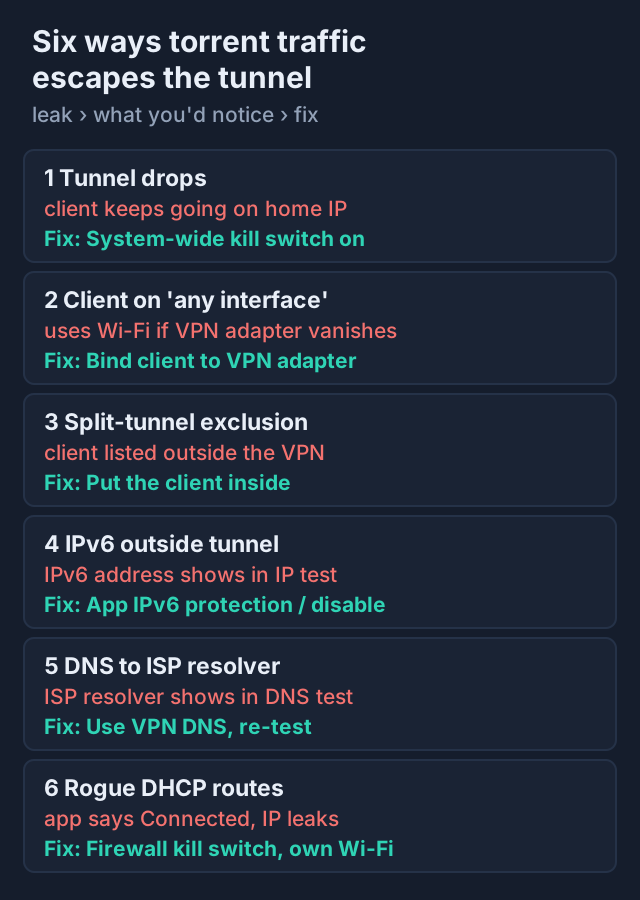
A leak is any packet from your torrent client, or any lookup it triggers, that leaves your machine outside the tunnel. Leaks are the reason people who believe they are protected sometimes are not. They rarely announce themselves; the torrent keeps running and the VPN app still says Connected. These are the common ones, with what you would notice and how to close each gap.
The tunnel drops
VPN connections drop on sleep and wake, Wi-Fi changes and server restarts. A torrent client reconnects aggressively, so in the gap it simply carries on over your normal connection. A system-wide kill switch, which blocks all traffic whenever the VPN is down, closes this hole. Do not assume yours is on; open the settings and look. On NordVPN's Linux app the switch is the command nordvpn set killswitch on, while Mullvad's help pages say its desktop kill switch is always on and cannot be turned off. Our kill switch guide for torrenting explains the types.
The client is not tied to the tunnel
qBittorrent's network interface setting defaults to any interface, which means it will happily use your physical adapter if the VPN adapter vanishes. Binding the client to the VPN's adapter makes it stop instead. Proton's own support page lists the names to choose: ProtonVPN TUN for OpenVPN on Windows, ProtonVPN for WireGuard or Stealth, and tun0 or proton0 on Linux. On Linux, NordVPN's app names its tunnels nordlynx and nordtun.
Split tunnelling sends the client outside
Split tunnelling is handy, but one wrong tick in the app list sends your torrent client around the tunnel while everything else looks protected. If you use it, make sure the client is on the inside of the rule, then confirm with the test below. The trade-offs are covered in split tunnelling for your torrent client.
IPv6 and DNS take another path
A home line with IPv6 can leak if the VPN carries only IPv4 packets, because the IPv6 ones simply go the normal way. Providers handle this differently. Proton VPN says it tunnels IPv6 where the server supports it, by default on Linux and Android, behind a toggle on Windows, and turns IPv6 off on macOS and iOS to prevent exposure. NordVPN's Linux app removed its IPv6 option in version 4.0.0, saying IPv6 support is on hold over leak risks. Mullvad offers an in-tunnel IPv6 setting. DNS is the other classic: if lookups go to your ISP's resolver, the ISP sees the tracker and site names even though the data is encrypted. Use the VPN's own DNS and test it.
A hostile network rewrites your routes
A 2024 finding called TunnelVision (CVE-2024-3661), from Leviathan Security Group, showed that a rogue DHCP server on your Wi-Fi can push option 121 routes that pull packets out of the tunnel while the app keeps reporting Connected. Android was reported as unaffected because it ignores option 121. VPNs that enforce a firewall-based kill switch block that traffic instead of letting it out. For long transfers, prefer networks you control.
Check it yourself: torrent IP test
You do not have to trust any of this. A torrent IP check shows the address your client actually announces to a tracker, which is what the swarm and anyone monitoring it would record. ipleak.net, a free tool powered by AirVPN, offers a Torrent Address detection feature: it gives you a magnet link to a fake file whose tracker is controlled by the site and records what your client sends. Nothing real is downloaded.
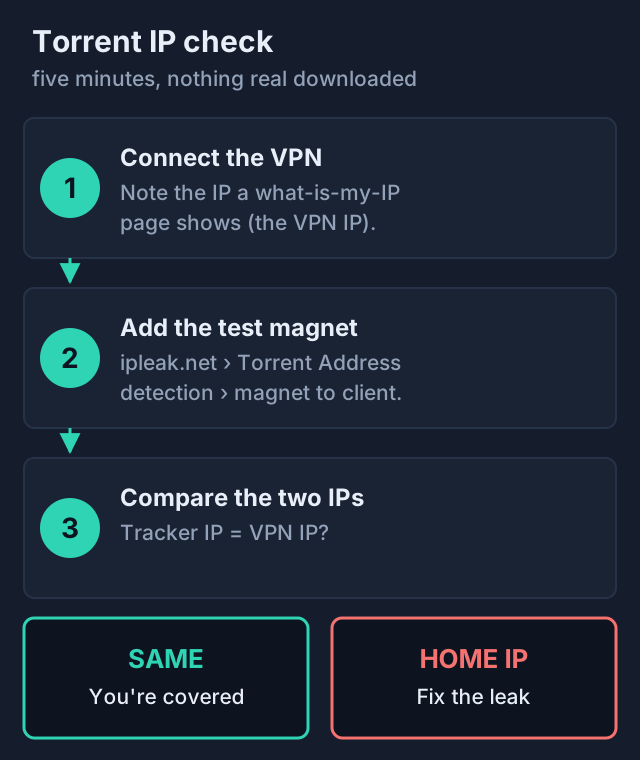
- Connect the VPN, then open a what-is-my-IP page and note the address it shows. That is the VPN server's IP.
- On ipleak.net, activate Torrent Address detection and add the magnet link it gives you to your client. Leave it running for a minute.
- Read the IP the page reports. If it matches the VPN address, your client announces through the tunnel. If it shows your home IP, or an IPv6 address you recognise as yours, you have a leak to fix.
- Now force a drop: quit the VPN app or switch Wi-Fi off and on. A bound client should stall and report nothing new. If the tracker records your home IP, the kill switch or binding is not doing its job.
Run the test again whenever you change protocol, because the interface name can change with it, and after any major app update. Our torrenting privacy checklist turns these steps into a routine.
What the ISP can still infer
Even with no leaks at all, a VPN hides the content of your traffic, not the fact of it. Your ISP still sees the IP address of the VPN server, and VPN providers' server ranges are widely known. It sees when you are connected and how much data flows each way. A session that moves tens of gigabytes overnight with steady upload in both directions has a shape, and while that shape fits a cloud backup or a game download just as well as P2P, it is there in the logs.
VPN protocols themselves can also be recognised. WireGuard and OpenVPN have identifiable handshakes, which is why some providers offer obfuscated or stealth modes for networks that block VPNs. Recognising a VPN is not the same as seeing what is inside it, though. Your ISP may know you use one; it does not learn what you do with it.
Finally, the view moves rather than disappears. Your VPN provider can see the connection to the swarm that your ISP lost. That is why the provider's record matters more than its marketing: look for a no-logs policy that has been checked by a named auditor on a stated date, and for how the company behaved when someone came asking for data. If you want a provider with a P2P track record you can verify, NordVPN's audit history and P2P on every standard server make it a reasonable default, and you can compare its plans here.
The legal line
Hiding torrenting from your ISP is a privacy measure, not a legal one. Using a VPN is lawful in most countries, and torrenting files you have the right to share is lawful too. Downloading or seeding copyrighted work without permission stays unlawful whichever route the packets take. Rights holders who watch a swarm see the VPN server's IP rather than yours, but that changes who can link the activity to you, not whether it was legal. In some places, notably the US and Canada, ISPs forward copyright notices tied to an IP address; our guide to whether torrenting is legal explains where the line sits.
Edge cases worth knowing
- Phones. Proton VPN switches IPv6 off on iOS and macOS rather than tunnelling it, and Apple's App Store does not allow torrent clients, according to Proton's support pages. Long transfers belong on a desktop where you can bind the client.
- Free tiers and P2P. Proton VPN's free plan includes a kill switch but lists P2P support as a paid feature. Many free VPNs block P2P outright or fund themselves in ways you would not choose; see why free VPNs are bad for P2P.
- Router VPNs. A VPN on the router covers every device, but the router has no idea which app is your torrent client, so per-app binding and kill switches on the computer still matter.
- Seedboxes. A seedbox moves the torrenting to a remote server, so your ISP sees only your download from the seedbox. It solves a different problem; compare the two in seedbox vs VPN.
Does a VPN hide torrenting from your ISP? FAQ
Does a VPN hide torrenting from my ISP?
Can my ISP tell I am torrenting through a VPN?
What happens if I torrent without a VPN?
Does qBittorrent encryption hide torrenting from my ISP?
How do I check that my VPN is hiding my torrent IP?
Ready to pick one? See the best VPNs for torrenting, compared, or start with whether torrenting is safe in the first place.