How to Bind qBittorrent to Your VPN (Windows, Mac, Linux)
To bind qBittorrent to your VPN, connect the VPN first, then open qBittorrent's Options, go to Advanced and set Network interface to the VPN's adapter instead of the default, any interface. Restart qBittorrent. From then on it can only send and receive through the tunnel, so if the VPN drops, transfers stop rather than falling back to your home connection.
The fiddly part is knowing which adapter to pick, because every VPN names its adapter differently and the name can change when you switch protocol. This guide gives the names providers document, a before-and-after method for the ones they don't, the steps for Windows, macOS and Linux, and a test that proves the binding works. It is written for lawful peer-to-peer; binding protects your privacy, it does not change what is legal to share.
What binding does (and why a kill switch isn't enough)
A VPN app's kill switch watches the connection and blocks traffic when it notices the tunnel has gone. Binding works from the other end. It tells qBittorrent which network adapter it may use, and the client refuses every other route. When the VPN disconnects, its virtual adapter disappears or goes idle, and qBittorrent has nowhere to send packets. Nothing needs to notice the drop for the protection to work.
The two are complementary rather than either-or. A kill switch protects every app on the device, including your browser, but it depends on the VPN app being in a good state and on the feature actually being switched on in its settings. Binding protects only qBittorrent, but it keeps working if the VPN app crashes, updates or is quit by mistake. For a client that may run unattended for hours, having both is the sensible set-up. Our kill switch guide for torrenting covers the other half.
Find your VPN's interface name
qBittorrent shows a list of every network adapter on your machine, and the VPN's adapter only appears while the VPN is connected. Some providers document what theirs is called. The table lists the names we could confirm on providers' own pages or code on 9 October 2026; where a provider does not publish a name, use the before-and-after method below.
| Provider | Windows | macOS | Linux |
|---|---|---|---|
| Proton VPN | ProtonVPN (WireGuard, Stealth); ProtonVPN TUN (OpenVPN) | A utun entry, e.g. utun5 | proton0 (WireGuard); tun0 (OpenVPN) |
| NordVPN | Not documented; use before/after | Not documented; use before/after | nordlynx (NordLynx); nordtun (OpenVPN) |
| Windscribe | Often Windscribe or Wintun | A utun entry | A wg or tun entry |
| Mullvad | Mullvad (or Mullvad GotaTun) | A utun entry, e.g. utun4 | wg0-mullvad |
| PIA, others | Not documented; use before/after | A utun entry | Not documented; use before/after |
Sources: Proton VPN's BitTorrent support page; the open-source NordVPN and Mullvad clients on GitHub (NordVPN's interface constants nordlynx and nordtun; Mullvad's wg0-mullvad on Linux and a Windows adapter named Mullvad, or Mullvad GotaTun for its userspace tunnel); Windscribe's qBittorrent knowledge-base article. Builds change, so confirm the name on your own machine. On macOS, VPN tunnels normally appear as numbered utun entries, so the number matters more than any label.
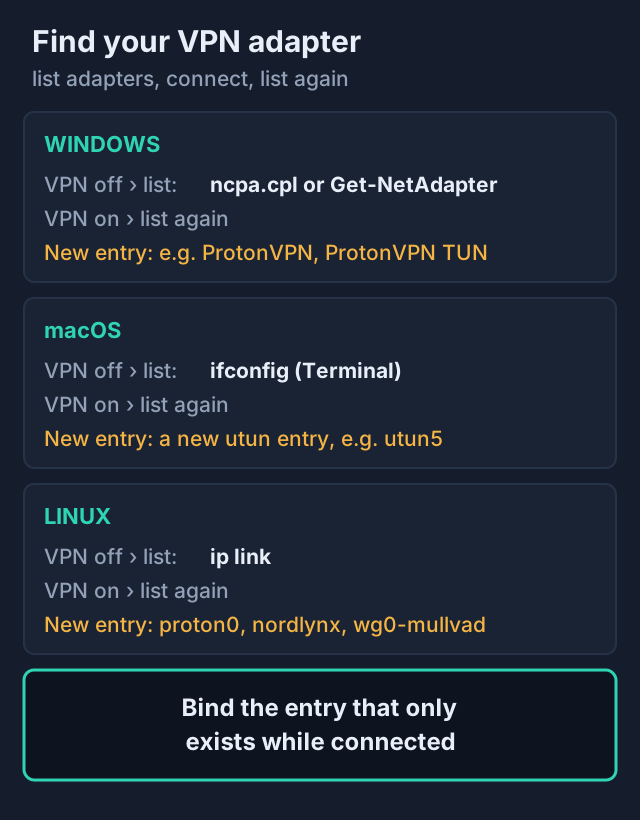
The before-and-after method
- Disconnect the VPN and list your adapters. On Windows, open Network Connections (Win+R, then ncpa.cpl) or run Get-NetAdapter in PowerShell. On macOS, run ifconfig in Terminal. On Linux, run ip link.
- Connect the VPN with the protocol you normally use and list them again.
- The entry that is new is the VPN's adapter. Write down its exact name, including any number, and note which protocol you were on.
The protocol note matters. Proton's support page is explicit that if you change protocols you need to update the network interface setting again, because WireGuard and OpenVPN create different adapters. The same applies to NordVPN on Linux, where NordLynx uses nordlynx and OpenVPN uses nordtun.
Bind it: Windows, macOS, Linux
The setting itself is the same everywhere; only the menu location and the adapter name differ. qBittorrent's own wiki describes the path as Tools, Options, Advanced, then the Network Interface drop-down. Make the change with the VPN connected, otherwise the adapter will not be in the list.
Windows
- Connect your VPN, using a P2P server if your provider has them.
- In qBittorrent, open Tools, then Options, then Advanced.
- Set Network interface to the VPN adapter, for example ProtonVPN for Proton on WireGuard.
- Leave Optional IP address to bind to on All addresses, as Windscribe's guide advises, because the tunnel's IP can change on reconnect.
- Click OK and fully restart qBittorrent.
macOS
On a Mac the options sit under the qBittorrent menu rather than Tools. Choose the utun entry you identified with ifconfig. The utun number is not fixed and can differ from one session to the next, so if transfers stall after a reboot or an app update, repeat the before-and-after check and pick the current entry.
Linux
Linux names are the most readable: proton0 or tun0 for Proton, nordlynx or nordtun for NordVPN, and a wg or tun entry for most WireGuard and OpenVPN set-ups. Select the name in the same Advanced menu.
If you are still choosing a provider and want documented adapter names on Linux, NordVPN's open-source Linux client makes its interfaces easy to find; you can compare NordVPN's plans here. If you would rather have names documented on every desktop OS plus in-app port forwarding, Proton VPN's paid plans cover P2P on Windows, macOS and Linux. Our best VPN for torrenting comparison covers the wider field.
Test it
Binding is only worth having if you have seen it work. The test takes two minutes and needs a tracker that reports the IP your client announces. ipleak.net, which is powered by AirVPN, has a Torrent Address detection feature built for this: it hands you a magnet link to a dummy file and shows the IP its tracker receives.
- With the VPN on, add the ipleak.net detection magnet to qBittorrent. The address it reports should be your VPN server's, not your home IP.
- Now disconnect the VPN, or quit its app, while the dummy torrent is still in the list.
- Watch qBittorrent. A correctly bound client shows no new connections, the tracker gets no fresh announce, and the status bar reports no traffic.
- Reconnect the VPN. If qBittorrent does not resume, restart it; the qBittorrent wiki notes that a restart is sometimes needed before transfers start on the bound adapter.
If the tracker ever records your home IP after you disconnect, the binding is not applied. The usual causes are choosing the physical adapter by mistake, a changed adapter name, or changes that were not saved because qBittorrent was not restarted. Our torrenting privacy checklist folds this test into a routine.
After changing protocol
This is where most bindings quietly break. Switch Proton from WireGuard to OpenVPN on Windows and the adapter changes from ProtonVPN to ProtonVPN TUN; switch NordVPN on Linux from NordLynx to OpenVPN and nordlynx is replaced by nordtun. qBittorrent keeps pointing at the old name, which no longer carries traffic, so downloads stall. That fails safe, but it looks like a broken VPN.
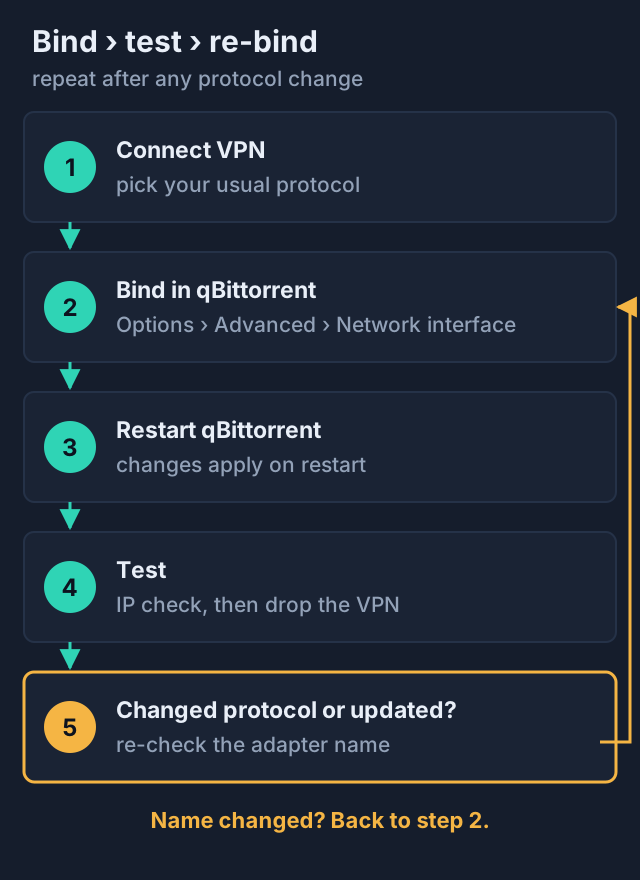
The habit to build is simple: whenever you change protocol, update your VPN app or notice stalled torrents, recheck the adapter list and re-bind. Pinning one protocol in your VPN app's settings, rather than leaving it on automatic, keeps the adapter name stable and avoids most of these surprises.
Edge cases
- Split tunnelling. If your VPN's split tunnelling excludes qBittorrent, binding to the VPN adapter will stop it working at all. Include qBittorrent in the tunnel; see split tunnelling for your torrent client.
- Port forwarding. Binding does not change the listening port. If your provider forwards a port, enter that port in qBittorrent's Connection settings; NordVPN does not offer port forwarding, as our port forwarding explainer covers.
- SOCKS5 proxies. A proxy set in qBittorrent's Connection settings is a different thing: it routes peer traffic through a proxy server, but SOCKS5 itself does not encrypt traffic. It does not replace binding to a VPN tunnel.
- Docker and seedboxes. Containers that bundle a VPN with qBittorrent usually handle routing inside the container; follow that image's own documentation rather than this menu.
Binding qBittorrent to a VPN: FAQ
How do I bind qBittorrent to my VPN?
Which network interface should I choose for my VPN?
Is binding qBittorrent better than a kill switch?
Why did qBittorrent stop downloading after I bound it?
Should I set the optional IP address to bind to?
Ready to pick one? See the best VPNs for torrenting, compared, or start with whether torrenting is safe in the first place.